


Most enterprises don’t have a GPU performance problem—they have a GPU wastage problem. Clusters packed with A100s and H100s routinely run GenAI workloads at a fraction of their capacity, burning budget on idle VRAM, unused compute, and over-provisioned “just in case” headroom. The result is quiet but massive leakage in AI infrastructure spend, especially in on-prem and AI-in-a-Box deployments where scaling out means buying more boxes.
In this article, we explore Bud AI Foundry’s heterogeneous GPU virtualization system, including our newly introduced proprietary virtualization method called Fixed Capacity Spatial Partitioning (FCSP). You’ll learn how Bud’s multi-layer virtualization engine safely slices GPUs across any vendor, hardware tier, or generation—dramatically increasing utilization without compromising isolation or SLOs.
The GPU Underutilization Problem
The majority of GenAI deployments consume only a fraction of their GPU’s capability. Take a common example: running a Llama-3-8B model on an NVIDIA A100 40GB. In real-world enterprise settings, that workload typically uses just 20-30 GB of VRAM with 60-70% GPU utilization, with occasional spikes. The rest of the GPU’s capacity sits idle—yet the organization is still paying the full cost of the hardware, power, cooling, and operations. This underutilization adds up quickly.
In a 10-node H100 cluster, where each node costs $85–$120 per hour, operating at 30% underutilization results in approximately $183K–$259K in wasted spend per month. Those unused resources could instead support additional workers, embedding pipelines, guardrail systems, or other model workloads.
So why can’t we simply run multiple models on the same GPU?
Running multiple models on a single GPU isn’t as simple as placing them side-by-side. Each workload competes for VRAM, compute cores, memory bandwidth, interconnect capacity, kernel execution time, and even low-level driver pathways. Unless these resources are isolated with surgical precision, one model can easily starve another, a single out-of-memory event can collapse the entire card, and minor contention can cascade into broken latency SLOs.
Achieving this level of control requires deep GPU virtualisation engineering expertise—kernel-level scheduling knowledge, driver internals, vendor-specific memory partitioning behavior, and orchestration techniques that most enterprises simply don’t possess. And because isolation isn’t standardized across vendors—or even across GPU generations within the same vendor—the problem becomes exponentially harder to manage at scale. Lacking this capability, organizations default to the only option they can manage safely: buying more GPUs, even when the ones they already own remain largely underutilized.
Bud’s Heterogeneous GPU virtualization
To solve these challenges, Bud AI Foundry introduces a multi-layer GPU virtualization engine capable of slicing GPUs across:
- all major vendors: NVIDIA, AMD, Intel, Huawei, Qualcomm
- all deployment models: on-prem, air-gapped appliances, AWS/GCP/Azure
- all GPU tiers: high-end, mid-range, entry-level, legacy
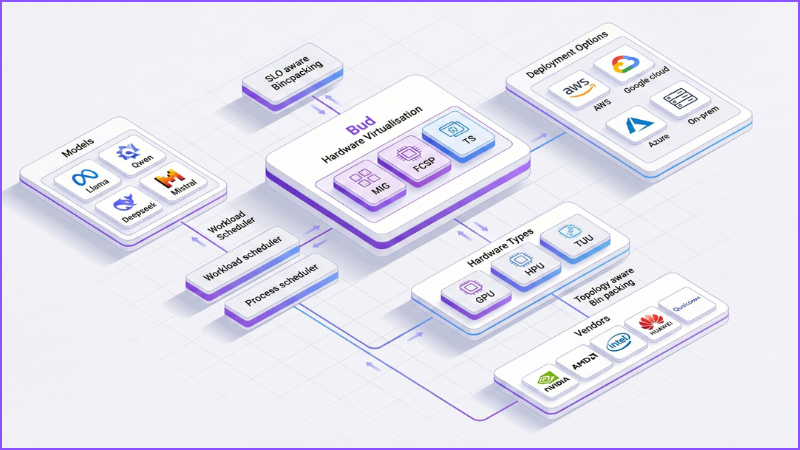
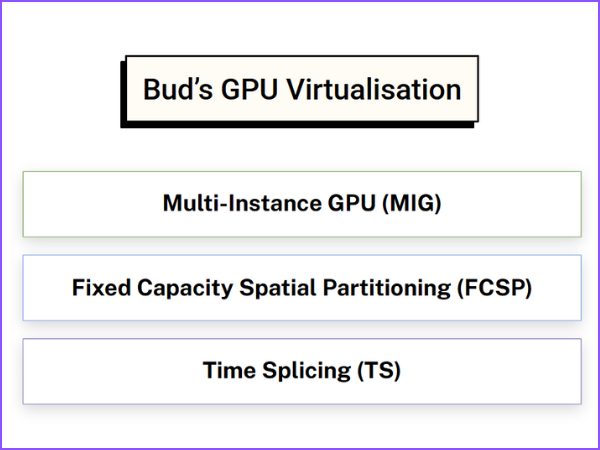
At the core of this system is the new Fixed Capacity Spatial Partitioning (FCSP) technology — our proprietary virtualization method that enables strong isolation, predictable performance, and efficient multi-tenant GPU usage even on commodity GPUs. Bud Foundry uses three virtualization strategies, automatically selected based on hardware capabilities:
Hardware-Level Virtualization (MIG)
For high-end GPUs like NVIDIA A100/H100 that support hardware-level virtualisation, Bud uses Multi-Instance GPU (MIG) method. MIG allows a single physical card to be carved into multiple GPU instances at the hardware and firmware level. Each instance is assigned its own chunk of GPU memory along with a dedicated share of compute and internal bandwidth, so one workload cannot overrun another’s resources. Because this partitioning happens inside the GPU itself, Bud can treat each MIG slice as an independent device, delivering strong isolation and highly predictable performance while keeping virtualization overhead on our side effectively negligible.
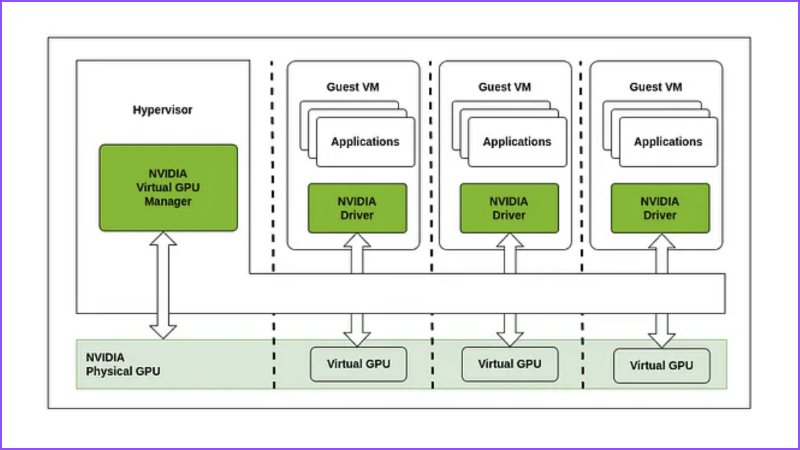
Bud uses MIG whenever available to provide:
- Native hardware isolation
- Zero overhead
- Maximum predictability
- Strict SLO guarantees
However, most GPUs in the market today—especially mid-range and entry-level cards—don’t support MIG like virtualisation. So for those, Bud developed a proprietary method called Fixed-capacity spatial partitioning, in short FCSP.
Fixed Capacity Spatial Partitioning
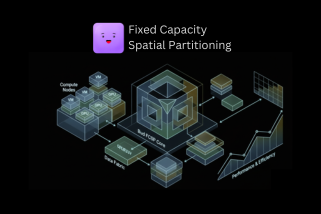
FCSP virtually slices the GPU into isolated chunks at software level, with guaranteed VRAM and compute, effectively turning a single GPU into several independent virtual GPUs. Each slice behaves just like a dedicated GPU card, with stable performance and strong isolation. FCSP works through a three-level scheduling model that keeps both SLOs and low-level execution under tight control.
SLO-aware request binpacking
At the first level, FCSP performs SLO-aware request binpacking: every workload is evaluated in terms of model size, VRAM footprint, SLOs, compute intensity, and expected concurrency. Using this profile, FCSP maps workloads onto virtual GPU slices in a way that avoids collisions, ensuring each slice is provisioned with enough VRAM, sufficient compute cycles, and the latency headroom it needs, while staying insulated from noisy neighbors running on the same physical card.
Process-level scheduler
Once a workload is placed into a slice, FCSP’s process-level scheduler takes over. Inside each slice, individual processes, threads, and memory allocations are orchestrated by a custom scheduler that controls who runs when, for how long, and under what conditions execution is preempted or terminated. It enforces execution windows and ordering, prevents misbehaving kernels from monopolizing the device, and maintains isolation between unrelated workloads sharing the same GPU. Together, the binpacking logic and process scheduler allow FCSP to deliver MIG-like isolation and predictability—even on hardware that doesn’t support MIG at all.
Topology-aware Bin Packing
In real-world environments, GPU clusters are anything but uniform. A single deployment might combine GPUs from multiple vendors, for example, NVIDIA A100s with AMD cards. And deployments could stretch across both on-prem racks and multiple clouds. Some machines host a single GPU; others pack eight GPUs linked by NVLink, all ultimately hanging off different PCIe roots and NUMA domains. In this kind of landscape, simply “finding a free GPU” is no longer enough.
FCSP extends beyond per-device slicing into topology-aware bin packing, where placement decisions are made with a full view of the hardware topology. It takes into account GPU-to-GPU bandwidth, the exact NVLink and PCIe connectivity map, locality between CPUs and GPUs, and which workers are physically closest to which accelerators.
By aligning workloads with the underlying topology rather than treating the cluster as a flat pool, FCSP reduces cross-GPU contention, cuts down on expensive hops over congested links, and smooths out tail latencies caused by network or interconnect bottlenecks. The result is more predictable distributed inference, higher efficiency in multimodal and multi-stage pipelines, and substantially better throughput at the scale where these details really matter.
Time Slicing (TS)
Not every deployment runs on the latest datacenter GPUs, and many production clusters still rely on older cards that can’t support MIG or FCSP-style partitioning. On this legacy hardware, Bud falls back to a lightweight time-slicing scheduler.
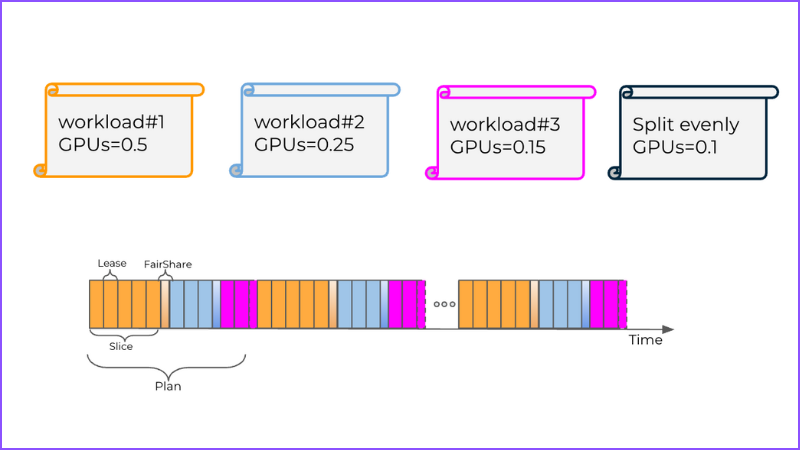
Instead of trying to carve the GPU into hard slices, the scheduler rapidly context-switches between workloads, allocating each one controlled windows of execution time. This prevents any single model from monopolizing the device, enforces a baseline level of fairness, and keeps long-running kernels from blocking everything else. The result isn’t isolation in the strict, hardware-enforced sense you get with MIG or FCSP—but it does make true multi-model inference possible on GPUs that would otherwise be locked to a single workload. In environments with older accelerators, that can mean the difference between stranded capacity and a usable shared GPU pool.
Bud’s Hardware Virtualization Advantage
Bud AI Foundry isn’t just about “running models on GPUs”—it’s an inference fabric designed to squeeze maximum value out of every accelerator you own, regardless of vendor, form factor, or where it’s deployed. The virtualization layer is built for heterogeneous fleets, multi-tenant workloads, and infra teams that don’t have the luxury of a perfectly uniform cluster or a large GPU engineering group.
Heterogeneous by design : Bud’s virtualization layer spans GPUs from multiple vendors—NVIDIA, AMD, Intel, Huawei, Qualcomm—as well as GPU-as-a-service offerings from major cloud providers. The same abstraction works whether your workloads are running in a single on-prem cluster, across regions in the cloud, or in hybrid environments.
Multiple virtualization strategies, one unified platform : Under the hood, Bud combines hardware and software techniques: MIG for datacenter-class GPUs that support it, FCSP for mid-range and commodity hardware, and time-slicing for older cards. This lets you slice and share almost any GPU, not just high-end SKUs, while keeping a consistent operational model.
Multi-layer optimization and dynamic fractionalization : A continuous optimization pipeline monitors workload characteristics, SLOs, and hardware capabilities, then dynamically fractionalizes GPUs into right-sized slices. This drives near-maximum utilization and stable latency while still preserving strong isolation between tenants and workloads.
First-class integration with modern orchestration : Bud plugs cleanly into Kubernetes, OpenShift, and similar platforms, exposing virtualized GPUs as schedulable resources. That means your existing deployment workflows, operators, and CI/CD pipelines can target shared GPUs without any special cases or custom hacks.
Deep visibility with rich analytics and visualizations : The platform provides detailed dashboards showing how each GPU is sliced, which workloads are mapped to which slices, and how scheduling decisions evolve over time. You can inspect utilization, contention, and SLO adherence in real time, instead of treating GPU behavior as a black box.
Auto-Optimization Copilot for non-experts : To reduce dependence on specialist infra teams, Bud ships with an Auto-Optimization Copilot that continuously analyzes your deployments and suggests—or automatically applies—tuning changes. It handles GPU sizing, placement, and virtualization settings so you get expert-level efficiency without needing deep GPU or systems expertise in-house.
Practical Use Cases
Bud’s GPU virtualization isn’t just an infra trick—it opens up concrete, high-impact patterns for how you deploy and operate GenAI workloads across your fleet. Here are some of the most common ways teams put it to work:
- Turn idle headroom into a live guardrail system: Most production LLM endpoints run with significant VRAM and compute slack. With FCSP or MIG slices, you can use that unused capacity to deploy safety, compliance, and content-filtering models alongside your primary LLM—on the same GPU. Guardrails get low-latency access to the same data path, without needing a separate cluster.
- Let multiple teams share the same hardware safely: Instead of statically assigning whole GPUs to each team, Bud slices cards into isolated vGPU instances with clear SLOs and quotas. Platform, product, and research teams can all share the same pool while remaining logically and performance-wise isolated, eliminating “GPU silos” and stranded capacity.
- Help cloud and managed service providers maximize utilization: If you’re offering GPU-as-a-service, Bud lets you carve your fleet into fine-grained slices that match tenant workloads, instead of renting out whole GPUs. That means higher density per node, better yield per card, and the ability to offer differentiated SKUs (e.g., “fractional H100”) with strong isolation guarantees.
- Increase density in AI-in-a-Box appliances: For edge or on-prem “AI-in-a-box” setups, Bud enables multiple models—LLM, embeddings, vision, guardrails—to coexist on the same physical device. You get a full AI stack inside a constrained hardware envelope, without needing to ship bigger or additional boxes.
- Run staging and production on the same GPU fleet: With virtualized GPUs, you can dedicate slices to staging, canary, or shadow deployments on the same hardware that serves production traffic. This keeps environments behaviorally close, simplifies rollout, and reduces the cost of maintaining separate GPU clusters just for pre-production.
Bud AI Foundry’s heterogeneous GPU virtualization turns fragmented, underutilized GPU fleets into a unified, high-density inference fabric. By combining MIG, FCSP, and intelligent time-slicing with topology-aware scheduling, it lets you run more models, at lower cost, with stronger SLOs—so GPUs scale with your ambitions.
Frequently Asked Questions
1. How can I run multiple models on one GPU without VRAM conflicts?
Use per-model memory caps via hardware partitioning (MIG/vGPU) or software slicing. Pre-allocate VRAM regions, block allocations beyond quota, and avoid oversubscription. Combine static profiling with runtime monitoring, conservative batching, and admission control so sudden traffic spikes or larger prompts can’t push neighboring models into out-of-memory failures during real traffic spikes.
2. What’s the real difference between MIG-style hardware partitioning and time-slicing?
Hardware partitioning (like MIG) carves the GPU into fixed, isolated instances with dedicated memory and compute, giving strong predictability and low interference. Time-slicing keeps one shared memory space but rapidly switches workloads on and off the GPU, trading strict isolation for flexibility, easier support on legacy cards, and fairness too.
3. When a GPU is split into vGPUs, do they just appear as separate CUDA devices to my code?
Typically yes. Each virtual GPU is exposed as a separate logical device, often with its own CUDA device ID and reported memory size. Your code or scheduler just targets those IDs, like /dev/nvidia2, without knowing they’re slices. Some platforms also add resource annotations or labels for orchestration systems like Kubernetes.
4. How does GPU sharing impact my API latency—especially P95 and P99?
Sharing usually raises average utilization and can slightly increase tail latency if workloads contend. With good partitioning—fixed VRAM slices, fair schedulers, and SLO-aware binpacking—P95 can remain close to dedicated performance, though P99 often grows. Guardrails include per-slice rate limits, max concurrency, and circuit breakers when queues grow too long slightly.
5. Which metrics tell me if a shared GPU is underused or overloaded?
Track per-slice VRAM usage versus limits, SM and tensor core utilization, memory bandwidth, and kernel queue depth. Also watch request rate, per-model concurrency, P50/P95/P99 latency, and error rates. Underutilization shows as low compute and bandwidth; overload appears as rising queues, tail latencies, throttling, and elevated OOM or timeout errors slowly.
6. Does GPU virtualization increase the risk of outages or SLO/SLA violations?
Virtualization can add failure blast radius if poorly isolated. With strict resource caps, process-level isolation, and health checks, it mainly changes how incidents manifest, not how often. The key is guardrails: noisy-neighbor detection, automatic preemption, per-tenant SLOs, and fast eviction or rescheduling when a slice misbehaves or degrades in practice.
7. What new business models does safe GPU slicing enable (fractional SKUs, chargeback, bundled AI features)?
Safe slicing lets you sell fractional GPU SKUs, offer tiered performance plans, and implement internal chargeback based on slice size, usage, or SLO. You can bundle multiple AI features—LLM, embedding, guardrails—on one box, create low-cost “starter” plans, and run test or shadow deployments alongside production without extra hardware over time.
8. Do I need to change my model code or containers to run on Bud’s virtualized GPUs?
Generally, no. Bud’s virtualization layer is framework- and container-agnostic, so your existing PyTorch, TensorFlow, or LLM stacks usually run unchanged. You just target a virtual GPU instead of a physical one; most differences live in scheduling and config, not in model code or Docker images.
9. How does Bud choose between MIG, FCSP, and time-slicing, and can I override that choice?
Bud inspects each GPU’s capabilities and environment: if MIG is available, it prefers hardware slices; otherwise it uses FCSP, and finally time-slicing on legacy cards. Policy knobs let platform teams pin specific pools or workloads to a chosen mode when they need stricter isolation or behavior guarantees.
10. When Bud slices a GPU, how do those slices surface to me at deployment time?
From your perspective, slices appear as distinct, schedulable GPU resources. In Kubernetes, for example, they show up as extended resources or logical devices with their own capacities. When you deploy, you request a slice type or size; Bud’s control plane maps that request onto an actual partition transparently.
11. How does FCSP stop a noisy or buggy workload from breaking other tenants on the same GPU?
FCSP gives every slice fixed VRAM and compute budgets, enforced by a scheduler that can throttle, preempt, or kill misbehaving processes. It also isolates execution contexts and tightly controls kernel admission. If one workload becomes noisy, its slice saturates first, protecting neighbors’ memory, latency, and throughput from cascading failure.
12. What dashboards and metrics does Bud provide to show slicing, placement, and GPU wastage reduction?
Bud exposes dashboards for per-slice VRAM, compute utilization, contention, and SLO adherence, plus topology views showing placement across GPUs and nodes. You can see stranded capacity, noisy neighbors, and time-series trends for latency and throughput, making it straightforward to tie virtualization settings to measurable waste reduction and efficiency gains.






.png)


