


AI-in-a-Box appliances have become the preferred choice for enterprises that need GenAI to run on-premises, within air-gapped environments, or under strict physical control. But as organizations scale AI, they often hit the same roadblock where each use case ends up needing its own dedicated system, every model appears to require its own GPU, and every new idea from another team prompts another hardware purchase, so what begins as a clean, contained solution gradually turns into an ever-growing stack of isolated, single-purpose machines.
Under the hood, these boxes don’t usually have a performance problem—they have a utilisation problem. GPUs sit partially idle while IT teams are told, “We need another box.”
Hard Capacity Ceilings
Every AI-in-a-Box appliance comes with a fixed number of GPUs—sometimes a pair of high-end datacenter cards, sometimes a single mid-range accelerator. Without hardware virtualization, one GPU can only run one model—or support one team or use case.
The remaining GPU capacity is rarely usable. Extra VRAM or compute headroom exists mostly as a “just in case” buffer, reserved for unexpected spikes or contingencies. When a new major workload arrives, the only solution is often to deploy another box.
This means that even if a single model is using just 40–50% of its GPU’s VRAM and compute most of the time, that GPU is effectively tied up. The unused portion of the GPU remains stranded, unable to serve other workloads. Over time, this leads to inefficient utilization and wasted resources. For example, running a Llama-3-8B model on an NVIDIA A100 40GB. In real-world enterprise settings, that workload typically uses just 20-30 GB of VRAM with 60-70% GPU utilization, with occasional spikes.
In a 10-node H100 cluster, where each node costs $85–$120 per hour, operating at 30% underutilization results in approximately $183K–$259K in wasted spend per month. Those unused resources could instead support additional workers, embedding pipelines, guardrail systems, or other model workloads.
“Box per Feature” Sprawl
Every new AI capability—RAG, summarisation, vision, guardrails, embeddings—competes for GPU time. In a non-virtualised AI-in-a-Box environment, this quickly leads to infrastructure sprawl. To keep workloads isolated and predictable, organisations begin adding dedicated appliances for each function: one box for LLM inference, another for embeddings, another for vision. As different business units adopt AI, they receive their own boxes as well—risk, customer experience, product, research—all running similar workloads but on separate hardware. Even staging environments often need their own isolated appliances, kept apart from production systems.
Despite this growing fleet of boxes, each appliance typically operates far below its true capacity. Large amounts of GPU compute and VRAM sit idle most of the time. Yet the organisation still pays the full cost of these underutilised systems: the hardware itself, the power and cooling to keep it running, the operational overhead required to manage and monitor it, and the physical space it occupies in racks or remote sites. Over time, the gap between actual workload needs and infrastructure footprint becomes increasingly hard to justify.
Edge & Remote Site Constraints
AI-in-a-Box systems are especially valuable at the edge—in retail stores, factories, hospitals, and branch offices—where running AI workloads locally reduces latency and improves reliability. However, these environments come with significant practical constraints. Power and cooling are often limited, leaving little room to support additional hardware. Physical space is tightly controlled, making it difficult to accommodate extra servers or GPU appliances. Even when space exists, the logistics of shipping, installing, and configuring new hardware at a remote site can involve long lead times and operational friction.
In these locations, you rarely have the luxury of simply adding more GPUs when demand grows. Scaling has to come from using the existing hardware more efficiently, extracting more performance from the GPUs already in the box rather than expanding the footprint.
Why GPU Virtualization Is Non‑Negotiable for AI-in-a-Box
To transform AI-in-a-Box from a fixed, single-purpose device into an elastic platform, three capabilities are essential.
- First, you need strong isolation so that multiple models, tenants, and environments can safely share the same GPU without interfering with one another.
- Second, you need predictable performance, ensuring that latency and throughput SLOs are met even when workloads are bursty, diverse, or competing for the same hardware.
- Third, you need broad hardware compatibility—support that spans multiple GPU vendors and generations—because AI-in-a-Box appliances are often deployed with different GPUs depending on their tier, market, or release cycle.
Bud AI Foundry delivers all three through a multi-layer GPU-virtualisation engine. When the underlying hardware supports it, the platform can use hardware-level partitioning such as MIG. On mid-tier and commodity GPUs, it relies on Bud’s proprietary Fixed Capacity Spatial Partitioning (FCSP) to carve the device into reliably isolated slices. And on legacy hardware, it falls back to intelligent time-slicing that maintains fairness and stability while still driving high utilisation.
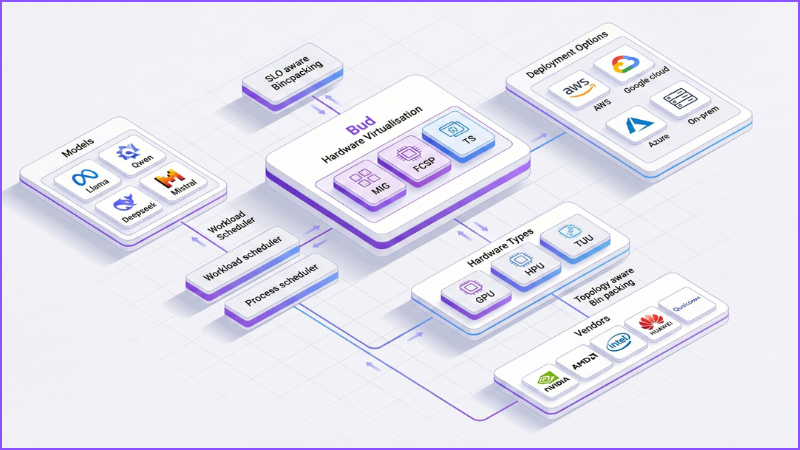
The result is far more than simple GPU “sharing.” It’s the ability to carve GPUs into right-sized, isolated virtual devices that behave predictably, each with its own performance envelope, while SLO-aware scheduling and topology-aware placement operate behind the scenes.
From Single Box to Virtual GPU Fabric
In a traditional AI-in-a-Box setup, the hardware configuration is straightforward: you might have two A100 or H100 cards, or perhaps one or two mid-range GPUs, with maybe a couple of older accelerators reserved for lighter tasks. To the orchestrator, these are simply physical devices—fixed, indivisible units that can each run only one major workload at a time.
Bud’s GPU virtualisation changes this model entirely. Instead of exposing raw physical GPUs, the same hardware is presented as a flexible pool of virtual GPUs, each with its own VRAM quota, compute allocation, and performance guarantees. These vGPUs appear to the orchestrator—Kubernetes, for example—as independent, schedulable GPU resources, each governed by specific SLOs and policies.
This shifts the mental model. Instead of thinking, “I have two GPUs,” you begin to think in terms of capacity: “I have eight vGPUs sized for LLM workloads, four tuned for vision models, and four for embeddings or guardrails—all running on the same physical box.” Let’s unpack how Bud makes that possible in an AI-in-a-Box context.
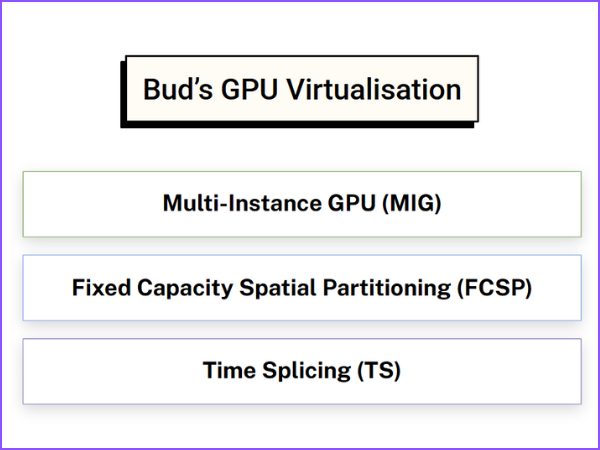
Hardware-Level Virtualisation (MIG) for Premium AI-in-a-Box SKUs
For AI-in-a-Box models that ship with NVIDIA A100/H100 or similar datacenter GPUs, Bud uses Multi‑Instance GPU (MIG) whenever it’s available. MIG allows the physical card to be carved into multiple hardware-enforced instances, each with:
- A dedicated VRAM partition
- A fixed share of compute and internal bandwidth
- Strong isolation at firmware and hardware level
In AI-in-a-Box, that translates to:
- One MIG slice for your primary LLM
- One or more slices for embeddings and RAG
- One slice for guardrails or safety models
- One slice for staging/canary deployments
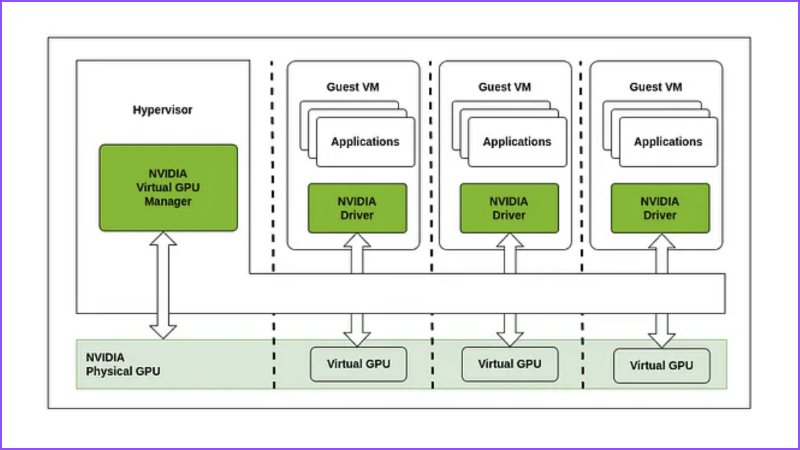
All inside a single appliance, all on the same card, with near‑zero overhead and strong predictability.
Fixed Capacity Spatial Partitioning (FCSP) for Mainstream and Edge Boxes
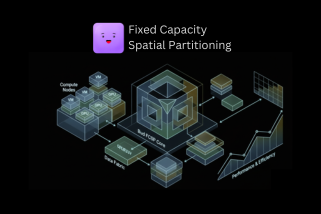
Most AI-in-a-Box SKUs don’t ship with H100s. They use mid‑range, cost‑optimised, or commodity GPUs—often without hardware partitioning like MIG. That’s where Bud’s proprietary GPU virtualisation method, called Fixed Capacity Spatial Partitioning (FCSP) comes in. FCSP virtually slices a GPU into multiple isolated vGPUs at the software level:
- Each vGPU gets a fixed VRAM budget and compute share
- Each vGPU behaves like a separate card to your runtime
- A noisy or buggy workload can saturate its slice—but not take down neighbors
Behind the scenes, FCSP coordinates several layers of intelligence to deliver predictable performance from shared GPUs. It begins with SLO-aware request binpacking, profiling each workload by model size, VRAM footprint, concurrency, and latency expectations. Using this information, FCSP arranges workloads into GPU slices in a way that avoids resource collisions and preserves the SLOs each application depends on.
On top of that, FCSP applies process-level scheduling to control exactly which kernels run, when they run, and for how long. It enforces execution windows and performs preemptions when necessary, ensuring that no single process can monopolise the GPU or starve others of compute time.
The system is also topology-aware. It understands how GPUs, CPUs, PCIe roots, and NVLink links are physically connected inside the box, and it places workloads on the GPU—or the pair of GPUs—that minimise hops, reduce bus contention, and make the most efficient use of the underlying hardware architecture.
In an AI-in-a-Box environment, all of this comes together to make the “full AI stack on one box” model viable. FCSP is the engine that enables reliable, high-utilisation GPU sharing even on mid-tier, commodity, or older accelerators.
Time-Slicing for Legacy AI-in-a-Box Fleets
Some AI-in-a-Box deployments rely on legacy GPUs that can’t support MIG or FCSP-style slicing. In those cases, Bud falls back to smart time-slicing.
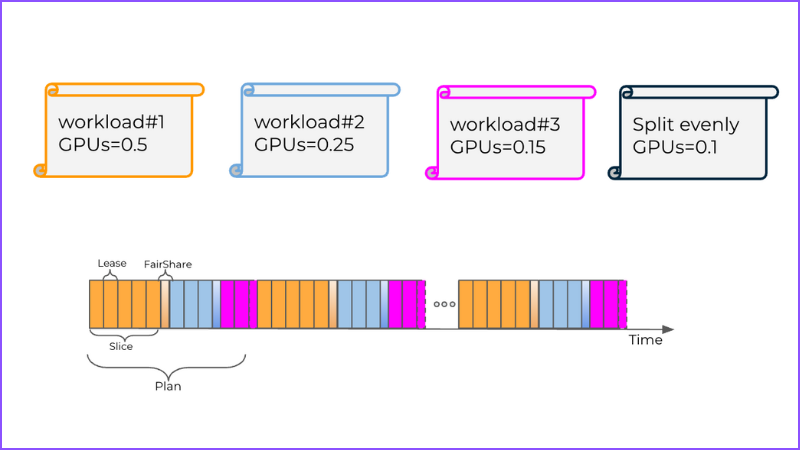
In this mode, multiple workloads operate within a shared memory space while the scheduler rapidly switches context between them. Execution windows are tightly controlled so that no single workload can block or overwhelm the others. Although this approach does not offer the hard isolation of technologies like MIG or FCSP, it still enables true multi-model operation on GPUs that previously could run only a single model at a time. It brings fairness across competing workloads and unlocks far more usable capacity from older hardware.
For OEMs and customers with large existing fleets, the impact is significant: instead of having to replace or expand hardware, you can upgrade the software stack and immediately gain better utilisation, improved performance sharing, and support for more complex AI workloads without adding new devices.
What This Unlocks for AI-in-a-Box
Bud’s GPU virtualisation turns AI-in-a-Box from “a fixed device” into a mini inference cloud in a chassis. Here’s what that looks like in practice.
Many Models, One Box
Instead of dedicating an entire GPU—or an entire AI-in-a-Box appliance—to a single workload, you can safely co-locate many different types of models on the same hardware. Large language models can run side by side with summarisation and agent-style workflows, while embedding models handle retrieval and semantic search in parallel. Vision models can process document or camera feeds at the same time, and guardrail or policy models can operate continuously in the background. Even supporting components such as analytics pipelines, logging services, and sidecars that benefit from GPU acceleration can share the same box.
Each of these workloads runs within its own slice, with clearly defined VRAM limits, predictable compute shares, and independent rate limits and SLOs. This allows many models and services to coexist safely and reliably, without interfering with one another, all on the same physical infrastructure.
Shared Appliances Across Teams and Tenants
For enterprises and OEMs, a single AI-in-a-Box appliance can now support a wide range of constituencies at once. The same hardware can serve multiple business units—customer experience, risk, R&D, operations—without requiring separate boxes for each team. Managed service providers can even allocate different slices to different customers or tenants, while simultaneously running both production workloads and staging or shadow traffic on the same device.
Bud exposes vGPUs as schedulable resources, for example through Kubernetes extended resources, which gives platform teams a high degree of control. They can assign each team its own vGPU quota, apply SLO and priority policies to individual slices, and implement internal chargeback or showback models based on actual consumption. This turns the AI-in-a-Box from a fixed hardware asset into a shared, multi-tenant platform with clear governance and predictable performance.
Higher Density, Fewer Boxes
By converting otherwise idle VRAM and compute into usable virtual slices, organisations can pack more AI capabilities onto each physical AI-in-a-Box appliance. This reduces the total number of boxes required at each site, and in many cases delays—or even eliminates—the need for additional hardware purchases.
For edge-heavy organisations such as retail chains, logistics providers, telcos, and healthcare systems, the benefits are particularly pronounced. Fewer appliances mean fewer truck rolls and on-site installations, a smaller power and cooling footprint at each location, and simpler inventory and SKU management. The result is a more efficient, scalable, and manageable AI deployment that maximises the value of existing hardware while supporting a growing range of workloads.
Faster Iteration Without New Hardware
With virtualised GPUs, organisations gain far more flexibility in how they deploy and scale AI workloads. New models can be launched in smaller “pilot” slices, enabling experimentation without consuming an entire physical GPU. Canary or shadow deployments can run alongside production workloads, and upgraded model versions can be tested without rearranging the underlying hardware. When a new use case proves successful, slices can simply be resized to allocate more resources, often eliminating the need to order additional boxes. This approach turns AI-in-a-Box from a static appliance into a truly agile platform for iterative development and rapid scaling.
Benefits for AI-in-a-Box OEMs
If you build or ship AI-in-a-Box appliances, Bud’s GPU virtualisation changes your roadmap in a few important ways:
- Richer SKUs without changing hardware every time : OEMs can now offer “fractional GPU” plans, providing customers with resources in smaller increments—such as one-eighth, one-quarter, or half of a GPU—so they only pay for the capacity they need. Multiple AI capabilities, including LLMs, RAG workflows, vision models, and guardrails, can be combined into a single appliance SKU, simplifying deployment and management. At the same time, premium SLO tiers backed by guaranteed isolation and SLO-aware scheduling ensure predictable performance, giving customers confidence that each workload will meet its service-level objectives.
- Better yield and utilisation across your fleet : Virtualisation also drives higher efficiency across the fleet. It increases the density of workloads per appliance, allowing more models and services to run on the same hardware. Utilisation becomes more consistent, even across mixed GPU generations and different hardware types, and built-in analytics provide clear visibility into resource wastage and potential contention. This level of insight and optimisation helps organisations get the most value from every AI-in-a-Box deployment.
- Simpler upgrades and lifecycle management : Bud’s GPU virtualisation also makes AI-in-a-Box appliances more future-proof. New virtualisation and optimisation features can be delivered through software updates, reducing the need for frequent hardware refreshes. The platform supports heterogeneous GPU lineups under a single abstraction, allowing different GPU models and generations to coexist seamlessly. This unified approach ensures that operational processes remain consistent, regardless of the underlying GPU vendor, simplifying management and maintaining predictable performance across the fleet.
Benefits for Enterprise and Edge Customers
For end customers deploying AI-in-a-Box across sites and data centres, the impact shows up in three dimensions:
- Cost & Utilisation: By converting idle GPU capacity into actively used virtual GPUs, organisations can dramatically increase utilisation without adding new hardware. This approach reduces the number of appliances required at each site or within a cluster, while also extending hardware refresh cycles by making more efficient use of the resources already in place. The result is a more cost-effective, higher-performing, and scalable AI-in-a-Box deployment.
- Reliability & SLOs: Strict slice-level caps protect critical workloads from interference caused by noisy neighbors, ensuring that each model or service receives the resources it requires. Even on shared hardware, P95 latency can remain close to that of a dedicated GPU, delivering predictable performance for demanding applications. At the same time, the system reduces the risk of outages caused by stray out-of-memory events or runaway kernels, providing a more reliable and resilient AI-in-a-Box environment.
- Agility & Feature Velocity: With GPU virtualisation, organisations can launch new AI use cases immediately, without waiting for additional hardware procurement. The same appliance can support more models, more tenants, and more experimentation simultaneously, enabling teams to explore and iterate rapidly. This approach aligns AI deployments with business priorities rather than being constrained by physical hardware, allowing companies to scale intelligently and respond to evolving needs.
Frequently Asked Questions
1. Why isn’t a single “big GPU box” enough for my AI needs?
Most AI-in-a-Box deployments end up running one big model or one team’s workload per GPU. Even if that model uses only 40–50% of the GPU, the rest of the capacity sits idle. As you add more use cases (LLMs, RAG, vision, guardrails, staging), you land in a “one box per feature” pattern that’s expensive, hard to manage, and impossible to scale at the edge. GPU virtualisation lets you run many workloads safely on the same hardware instead of buying more boxes.
2. What exactly is GPU virtualisation in the context of Bud AI Foundry?
GPU virtualisation is the ability to slice a physical GPU into multiple virtual GPUs (vGPUs), each with its own share of memory, compute, and performance guarantees. Bud AI Foundry exposes these vGPUs to your orchestrator (e.g. Kubernetes) as separate resources, so platform teams can allocate them to different models, teams, or tenants just like CPU and RAM in a cloud cluster.
3. How does this help my AI-in-a-Box deployments scale?
With virtualisation, one AI-in-a-Box appliance can host:
- Multiple LLMs and RAG/embeddings
- Vision models (document, image, camera feeds)
- Guardrails and policy models
- Staging, canary, and shadow deployments
…all at once, on the same set of GPUs, with isolation and predictable performance. That means higher density per box, fewer boxes per site, and the ability to add new use cases without new hardware.
4. Will GPU virtualisation hurt performance or increase latency?
Not if it’s done correctly. Bud AI Foundry’s virtualisation is SLO-aware: it allocates vGPUs based on model size, concurrency, and latency requirements. On premium GPUs (e.g. A100/H100), hardware-level MIG partitions give near bare-metal performance. On mid-range and legacy GPUs, FCSP and time-slicing are tuned to protect critical workloads, so your P95 latency remains close to dedicated GPU performance while still increasing utilisation.
5. Can I run multiple business units or customers on the same appliance safely?
Yes. vGPUs behave like strongly isolated “lanes” on the same hardware:
- Each BU or customer can get dedicated vGPU slices with fixed quotas.
- Noisy workloads in one slice cannot starve or crash critical workloads in another.
- Platform teams can enforce policies and SLOs per tenant and do chargeback/showback based on usage.
This is especially useful if you are an OEM, MSP, or platform provider offering AI appliances to multiple customers.
6. Do I need the latest, most expensive GPUs (like H100) for this to work?
No. Bud AI Foundry supports heterogeneous GPU fleets:
- On high-end GPUs, it uses MIG (hardware virtualisation).
- On mainstream / edge-friendly GPUs, it uses FCSP (Fixed Capacity Spatial Partitioning) to create stable vGPU slices in software.
- On older/legacy GPUs, it uses smart time-slicing to share the card fairly between workloads.
This means you can get virtualisation benefits out of the hardware you already have, not just the newest premium cards.
7. How does this reduce my total cost of ownership (TCO)?
You save money in multiple ways:
- Higher utilisation: Idle GPU capacity becomes vGPUs that run more workloads.
- Fewer appliances: One appliance can replace multiple single-purpose boxes.
- Longer hardware life: You upgrade capabilities with software instead of replacing hardware every time a new use case appears.
- Lower edge overhead: Fewer boxes means less power, cooling, space, and logistics at remote sites.
Overall, you get more AI capacity per rupee spent and a longer useful life for each box.
8. What changes for my platform / DevOps team?
They get a more cloud-like experience on-prem:
- GPUs show up as vGPU resources in Kubernetes (or similar orchestrators).
- They can assign vGPUs per namespace/team/app like any other quota.
- They can set SLOs and priorities (e.g. production > staging > experiments).
- They get observability into utilisation, contention, and waste across the fleet.
From their perspective, it’s just better scheduling and resource control; the virtualisation complexity is handled by Bud AI Foundry.
9. Can I still run pilots and experiments without impacting production workloads?
Yes, this is one of the main benefits. You can:
- Allocate small vGPU slices for pilots and POCs.
- Run canary and shadow deployments alongside production.
- Gradually resize slices as a use case proves value, instead of ordering new hardware.
If an experiment misbehaves, it’s contained within its vGPU slice and cannot take down production models.
10. How do I know if my existing or planned AI-in-a-Box setup needs GPU virtualisation?
You’re a strong candidate if any of these are true:
- GPUs are underutilised, but you still feel capacity-constrained.
- You’re considering buying more boxes just to support new use cases or teams.
- You operate many edge locations where adding hardware is painful.
- You need to serve multiple BUs/customers with strong isolation on shared appliances.
- Your platform team wants cloud-like control and observability over on-prem GPUs.
If you recognise yourself in two or more of these, GPU virtualisation (via Bud AI Foundry) will likely deliver both cost savings and faster AI rollout.




.png)


